Best Wireless Keyboards (2026) – Ranked
6 min read
Disclosure: We may earn a commission when you buy through links on this page, at no extra cost to you. Full details.
Ready to buy?
We'll take you to the best local price on Amazon
Top 5 Best Wireless Keyboards (2025) — Multi-Device Ranked
The best wireless keyboards let you type across multiple devices without touching a cable. Whether you're switching between a Mac, PC, and iPad, or you just want a clean desk without cord clutter, we ranked the top wireless keyboards on Amazon — from premium multi-device workhorses to budget Bluetooth picks that punch above their weight.
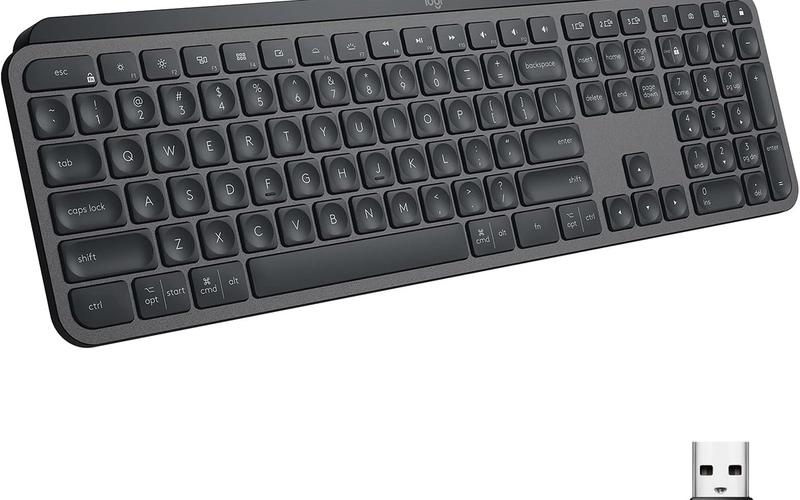
Our #1 Pick: Logitech MX Keys
The Logitech MX Keys is the best wireless keyboard for most people. Its smart backlighting adjusts to ambient light and brightens only under your fingertips, the keys feel premium and precise, and it seamlessly switches between three devices. It works equally well on Mac and Windows — a rare achievement.
| Feature | Logitech MX Keys | Apple Magic KB | Keychron K8 Pro | Surface Keyboard | Arteck HB192 |
|---|---|---|---|---|---|
| Connection Type | BT + USB dongle | Bluetooth | BT + USB-C cable | Bluetooth | Bluetooth |
| Multi-Device | 3 devices | 1 device | 3 devices | 1 device | 1 device |
| Battery Life | 10 days (lit) | 1 month | 4 weeks | ~1 year | 6 months |
| Backlit | ✓ | ✓ | ✓ RGB | ✗ | ✗ |
| Numpad | ✗ | ✗ | ✗ | ✗ | ✗ |
| Switch Feel | Scissor / premium | Scissor / light | Mechanical (hot-swap) | Scissor / quiet | Membrane / light |
| Mac Compatible | ✓ | ✓ | ✓ | ✗ | ✓ |
| Price | ~$110 | ~$100 | ~$95 | ~$100 | ~$20 |
1. Logitech MX Keys
~$110 — The MX Keys is engineered for productive multi-device work. It pairs with up to three devices via Bluetooth or USB dongle and switches between them with a dedicated key. The spherically-dished keycaps cup your fingertips naturally, and the smart backlighting activates only when your hands approach. USB-C charging means a 1-minute charge gives you 3 hours of use.
Pros
- Smart backlighting activates on approach and adjusts to ambient light automatically
- Seamless 3-device switching via dedicated Easy-Switch key
- Spherical keycaps and precise actuation make it one of the best-feeling scissor keyboards
Cons
- No numpad — the MX Keys S has a numpad version if needed
- Battery life drops to 10 days with backlighting on — turn it off for 5-month life
Verdict: The best wireless keyboard for most people. Particularly strong for anyone who works across Mac and Windows simultaneously.
2. Apple Magic Keyboard (with Touch ID)
~$100 — The Apple Magic Keyboard is the best wireless keyboard for Mac users who want a seamless, native experience. The Touch ID button provides biometric unlock and Apple Pay authorisation. The scissor mechanism is smooth and quiet, and the keyboard pairs instantly with any Apple device signed into the same Apple ID. The layout and function keys map perfectly to macOS.
Pros
- Touch ID integration enables biometric login and Apple Pay authorisation
- Native macOS integration — function keys, shortcuts, and gestures work perfectly
- Up to 1 month battery life on a single charge via Lightning
Cons
- Single-device only — no multi-device switching
- Lightning charging (not USB-C) on current models — awkward in a USB-C world
Verdict: The definitive Mac keyboard. If you use one Apple device and want Touch ID, there's no competition.
3. Keychron K8 Pro
~$95 — The Keychron K8 Pro is for anyone who wants a mechanical keyboard that works wirelessly across multiple devices. The hot-swap sockets let you change switches without soldering — a rare feature that lets you customise the typing feel to your preference. RGB backlighting, 3-device Bluetooth, and a Mac/Windows switch make it the most versatile keyboard on this list.
Pros
- Hot-swappable switches — change your typing feel without opening a solder iron
- 3-device Bluetooth plus USB-C wired mode covers every use case
- Full RGB backlighting with extensive customisation via Keychron's app
Cons
- Mechanical switches are louder than scissor alternatives — noisy in shared spaces
- Heavier than other keyboards on this list — less ideal for travel
Verdict: Best for mechanical keyboard enthusiasts who want wireless. The hot-swap feature alone justifies the price for anyone who takes typing feel seriously.
4. Microsoft Surface Keyboard
~$100 — The Microsoft Surface Keyboard is the most elegant Windows keyboard on this list. Ultra-slim, quiet, and refined, it pairs via Bluetooth and uses a standard AAA battery that lasts up to a year — no charging required. The keys are quiet, smooth, and well-spaced. Best suited to Windows users who want a premium-feeling keyboard that complements a Surface or clean desk setup.
Pros
- Up to 12 months battery life on one AAA battery — no charging management needed
- Ultra-slim, elegant design — one of the best-looking keyboards on this list
- Quiet keys with smooth actuation — ideal for open-plan offices
Cons
- Single-device Bluetooth — no multi-device switching
- Windows-optimised — not ideal for Mac users
Verdict: Best for Windows users who want a premium, quiet, low-maintenance keyboard. The year-long battery life is genuinely liberating.
5. Arteck HB192 Universal Bluetooth Keyboard
~$20 — The Arteck HB192 is a stainless steel Bluetooth keyboard for $20. It connects to up to three devices (though switching is less seamless than MX Keys), has a rechargeable battery lasting up to 6 months, and includes a Mac-compatible layout. For a secondary keyboard, travel use, or a budget-conscious home setup, it's hard to argue with the value.
Pros
- Stainless steel build at $20 — exceptional quality-to-price ratio
- 6-month battery life on a single charge via micro-USB
- Compatible with Windows, Mac, iOS, and Android
Cons
- Device switching is less refined than premium multi-device keyboards
- Membrane keys — noticeably less satisfying than scissor or mechanical options
Verdict: Best budget wireless keyboard. At $20 with a stainless steel build and 6-month battery, it's exceptional value for a secondary device or travel keyboard.
Weekly reviews in your inbox
No spam. Unsubscribe any time.